

Automotive Text Message Marketing for Auto Repair Shops: A Practical Campaign System

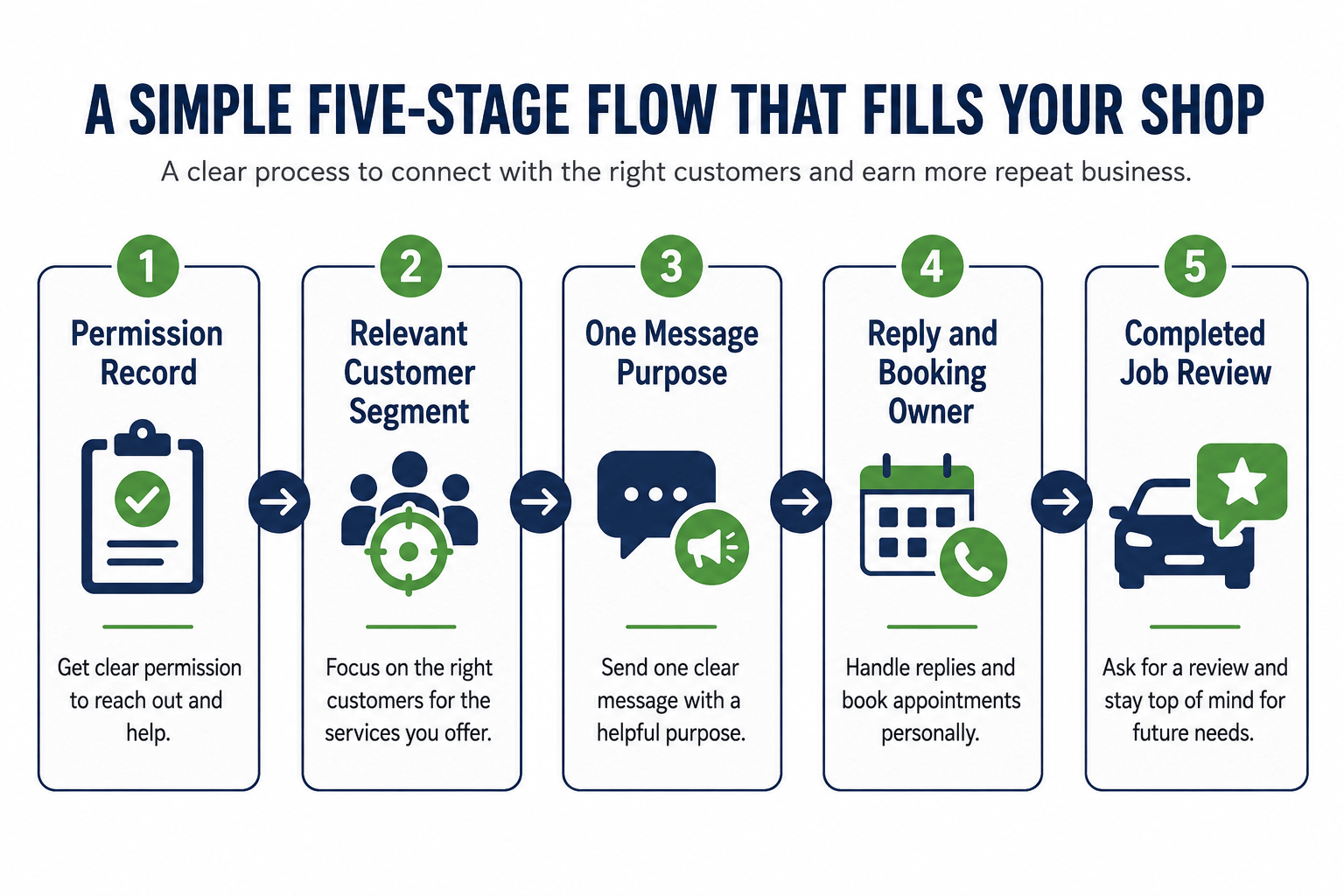
Automotive text message marketing is not a reason to send more messages. It is a way to make one useful invitation easier to see and act on when a customer has already given the shop permission to hear from it. A good text has a real reason, a defined audience, one next step, and a person ready to handle the reply.
For an independent repair shop, the practical goal is not an impressive send count. It is a clean path from a relevant customer record to a booked visit and, eventually, a completed repair job. That requires more discipline than a generic coupon blast.
SMS is one retention option, not a replacement for the full mix of auto repair shop marketing ideas. Use it when the shop already has a legitimate customer relationship and a relevant reason to reconnect.
This guide focuses on permission-based promotional SMS for existing customers. Confirmation and rescheduling can fit; open repair-order updates are service communication. Keep the purposes and owners distinct.
Contents:
- Start With the Message Purpose
- Build Consent and Suppression Into the Customer Record
- Use Six Campaign Types Instead of One Repeating Blast
- Segment by Repair Context, Not by Convenience
- Write a Text That Makes One Decision Easy
- Give Replies and Bookings an Owner
- Measure the Completed Job, Not the Text Send
- Run a Controlled First 30 Days
- Frequently Asked Questions
- Make Every Text Earn Attention
Start With the Message Purpose
The common SMS mistake is treating every phone number in a customer database as a marketing list. Start with purpose, then check the record, consent, timing, and follow-up process. If the team cannot explain why this person is receiving it today, the message is not ready.
| Message purpose | Use it when | Required next step | Keep out of this campaign |
| Appointment confirmation | A customer has a defined date or time and needs a simple way to confirm or change it. | Confirm, reschedule, or call. | Upsells, unrelated offers, and repair-status detail. |
| Seasonal service invitation | A known service need matches local driving conditions and the customer has permission for marketing texts. | View service details or request a time. | A generic all-services discount. |
| Service-history reminder | The shop can explain the vehicle, prior service, and reason for outreach without guessing the vehicle condition. | Ask a question or request an inspection. | A diagnosis or safety claim the shop has not made. |
| Reactivation | A former customer has been inactive long enough to justify a relevant check-in. | Reply, call, or request a visit. | Repeated reminders after an opt-out or no response. |
Use only campaigns that fit real services, seasons, capacity, and customer records. Do not promote a service the calendar cannot absorb.
Build Consent and Suppression Into the Customer Record
Before writing templates, decide where the shop will record the customer’s permission, preferred number, message category, and opt-out status. The record should be visible to the person sending a campaign and to the advisor handling a reply. A spreadsheet can work for a small test if it is controlled; a shared phone list without ownership cannot.
The wireless industry’s Messaging Principles and Best Practices emphasize consent and a way to opt out.
The FCC has also addressed consumers’ ability to revoke consent for robotexts. Treat those materials as a reason to document the process, not as a substitute for qualified legal or compliance advice for the shop’s location, platform, and message type.
- Record how and when the customer agreed to receive the relevant category of messages.
- Keep promotional permission separate from the contact details needed for an active repair order.
- Store opt-outs where every sender and automated workflow can see them before a send.
- Name one person to investigate an uncertain record instead of sending first and sorting it out later.
- Have counsel and the selected messaging provider review the shop’s consent language, required disclosures, registration, timing, and opt-out handling before launch.
A customer who opted out is not a lead to rescue with another list. Suppression is part of protecting trust and avoiding an avoidable operations problem.
Use a Purpose Check Before Every Send
This is an operating check, not a legal classification. It keeps a campaign from becoming a mix of promotions, open-repair updates, and unanswered replies. When the answer is unclear, pause the message and confirm the path.
| Before you send | Operational path | Owner | Do not combine it with |
| Is the customer confirming or changing a defined visit? | Appointment confirmation or rescheduling message with the exact expectation and next action. | Service advisor or booking owner. | A discount, review request, or unrelated offer. |
| Is the shop inviting an existing customer to consider a service? | Promotional campaign after checking the consent record, audience relevance, capacity, and suppression status. | Campaign owner with an assigned reply owner. | Open repair updates or approval requests. |
| Is the customer asking about an open repair order? | Service communication routed to the advisor or technician workflow. | Repair-order owner. | Bulk campaign reporting or promotional follow-up. |
| Is the consent record incomplete or the customer opted out? | Pause and resolve the record before any campaign action. | Manager or compliance owner. | A new send based on an old export or personal phone list. |
Use Six Campaign Types Instead of One Repeating Blast
Campaigns work best when they start with a repair-shop event rather than a monthly quota. The six examples below give a manager a finite menu. Pick one or two, assign ownership, and learn from the results before adding another.
| Campaign | Audience rule | Useful text angle | Measure |
| Appointment confirmation | Confirmed visits that need a clear arrival or drop-off expectation. | State the exact time, location, service summary, and reschedule path. | Confirmed, rescheduled, arrived. |
| Cancellation recovery | Customers who cancelled or asked to move a visit, where follow-up is appropriate. | Offer the next realistic path instead of assuming the old time still works. | Rebooked, declined, no response. |
| Seasonal service | Customers whose service history or vehicle use makes the offer relevant. | Connect one seasonal condition to one inspection or service choice. | Requests, bookings, completed work. |
| Maintenance check-in | Customers with a known prior service and a meaningful reason to revisit. | Invite a conversation about the next maintenance decision, not a diagnosis by text. | Replies, bookings, completed work. |
| Specialty-service reminder | Vehicles or customers that fit a service the shop genuinely performs. | Name the specialty and make the booking path clear. | Qualified inquiries and completed jobs. |
| Permissioned reactivation | Inactive customers with valid marketing permission and usable history. | Ask whether the vehicle needs attention and offer a low-friction way to reconnect. | Replies, opt-outs, bookings, completed work. |
Do not add declined-work follow-up, repair approvals, ready-for-pickup notices, review incentives, or a broad newsletter to this first campaign system. Those communications need their own rules and owners. Keeping the first test narrow makes it easier to see what customers respond to and what the front counter can handle.
Segment by Repair Context, Not by Convenience
A customer segment should tell the advisor why the message is relevant. ‘Everyone with a phone number’ is not a segment. Useful fields are usually already available in the shop management system or customer record, but only use fields the team trusts.
- Vehicle and service context: the work performed, service category, or a known maintenance conversation.
- Customer status: active customer, previously scheduled, inactive, or recently cancelled.
- Location and service capability: the shop, advisor, and service path that can actually fulfill the request.
- Permission and preference: marketing consent, current opt-out status, and the channel the customer chose.
- Capacity: open appointment types, realistic turnaround expectations, and the person who will handle replies.
A shop with limited diagnostic capacity should not send a broad diagnostic offer to every dormant contact. Choose a smaller audience, describe the inspection honestly, and stop when capacity is full.
Write a Text That Makes One Decision Easy
A useful text does not need to sound clever. It needs to identify the shop, explain the reason for the message, make one next step clear, and leave room for a customer question. Avoid stacking a discount, a service claim, a booking link, and a review request into one message.
| Element | What the customer needs to understand | Example |
| Identity | Who is contacting them. | Hi [First Name], this is [Advisor] at [Shop]. |
| Reason | Why this message is relevant now. | You asked to move your [service] visit. |
| Specific next step | What they can do without calling first. | Reply with a preferred day or use [booking path]. |
| Expectation | What happens after the response. | We will confirm the time after we check the schedule. |
Example: Hi [First Name], this is [Shop]. Your [service] visit is booked for [day] at [time]. Reply CONFIRM to keep it, or RESCHEDULE if you need another time. We will reply with the next available option.
Example: Hi [First Name], [Shop] is scheduling [season]-ready inspections for customers who plan to [relevant driving context]. If you would like us to check [one service area], reply BOOK or request a time here: [link].
Templates must match the shop’s real process, consent record, capacity, and provider requirements.
Copy-and-Customize SMS Templates
Use the placeholders only after the shop verifies that each detail is accurate. Every text needs a real reply path; do not automate an option the team cannot honor.
| Campaign | Template | Reply owner / stop rule |
| Appointment confirmation | Hi [First Name], [Shop] confirms [service] for [day] at [time]. Reply CONFIRM or RESCHEDULE. | Booking owner. Stop after confirmation, reschedule, or opt-out. |
| Cancellation recovery | Hi [First Name], [Shop] can help move your [service] visit. Reply with a preferred day and we will check times. | Booking owner. Stop if the customer declines or follow-up permission is absent. |
| Seasonal invitation | Hi [First Name], [Shop] is scheduling [season]-ready [inspection/service] for [driving context]. Reply BOOK or use [link]. | Campaign owner. Pause when appointment capacity is full. |
| Maintenance check-in | Hi [First Name], after [prior service], you may want to discuss the next maintenance step for [vehicle]. Reply QUESTION or BOOK. | Advisor. Do not make an unverified repair claim. |
| Specialty-service reminder | Hi [First Name], [Shop] is scheduling [specialty service] for [qualifying group]. Reply BOOK if it is relevant to [vehicle]. | Campaign owner. Use only for services this location can fulfill. |
| Permissioned reactivation | Hi [First Name], it has been a while since your last [Shop] visit. Reply BOOK or call [number] to plan your next maintenance visit. | Advisor. Suppress immediately on opt-out or wrong number. |
Give Replies and Bookings an Owner
A campaign creates a service obligation when a customer replies. Decide who receives replies, the response expectation, and how the advisor records the outcome. The reply owner must know whether to answer, route, or call.
- Assign a live owner for each campaign window and a backup for absences.
- Use a short outcome list: booked, needs advisor review, declined, opted out, wrong number, or no response.
- Require the advisor to log the service requested, the source campaign, the next step, and the final booking outcome.
- Stop or narrow a campaign when response volume exceeds the team’s ability to answer accurately.
- Keep a reschedule request separate from a new lead until the new appointment is actually confirmed.
If the shop’s real issue is not follow-up but a shortage of first-time demand, improving the retention message will not solve it. In that case, evaluate the broader work behind auto repair lead generation.
Measure the Completed Job, Not the Text Send
A delivery report can tell the team whether a message left the platform. It cannot tell the owner whether the campaign produced repair work the shop wanted. Use a simple campaign record that follows the same customer from audience selection to outcome.
| Stage | Track | Question for the weekly review |
| Audience | Eligible contacts and suppressed contacts. | Was the segment specific enough to justify the message? |
| Response | Replies, opt-outs, wrong numbers, and unanswered questions. | Did the message create useful conversations or confusion? |
| Booking | Requests, confirmed appointments, reschedules, and no-shows. | Could the front counter convert replies into a realistic visit? |
| Outcome | Completed repair jobs and gross profit when the shop can connect it reliably. | Was the campaign worth repeating for this service and audience? |
Do not borrow a benchmark from a software vendor and make it the shop’s target. Establish a baseline for one campaign, then compare it with the actual capacity used, customer complaints, opt-outs, booked visits, and completed work. A smaller audience with clear records may be more useful than a large send that produces unmanageable replies.
Run a Controlled First 30 Days
Start with a single campaign that matches current capacity. Appointment confirmation or a narrow seasonal invitation is often easier to audit than a large reactivation push. The manager’s job is to make the workflow dependable before making it bigger.
- Week 1: confirm the contact, permission, opt-out, audience, reply owner, booking path, and outcome fields.
- Week 2: send a small approved segment and review every reply before expanding the audience.
- Week 3: correct confusing copy, unresolved replies, duplicate records, or capacity mismatches.
- Week 4: review completed work, opt-outs, booking quality, and staff workload. Keep, adjust, or stop the campaign based on those outcomes.
A text campaign earns its place when it helps customers make a relevant next decision and the shop can fulfill that decision cleanly. That standard keeps the channel useful instead of intrusive.
Frequently Asked Questions
What is automotive text message marketing for an auto repair shop?
It is a permission-based way to send relevant SMS invitations, reminders, or follow-up prompts to customers. For a repair shop, the useful test is whether the message has a clear customer reason, an owned response path, and a measurable booking or service outcome.
Can an auto repair shop use text messages for appointment confirmations?
Yes, when the shop has the appropriate permission and a real process for confirmation or rescheduling. State the exact time, location, service expectation, and next action. Do not turn an appointment confirmation into a stack of unrelated promotions.
How often should a repair shop send marketing texts?
There is no safe universal number. Frequency should follow a relevant service event, the customer’s permission, the shop’s ability to answer replies, and the results of the campaign. Review opt-outs, complaints, bookings, and completed work before increasing frequency.
What should a repair shop measure from an SMS campaign?
Track the selected audience, suppression list, replies, opt-outs, booking requests, confirmed appointments, completed repair jobs, and gross profit only when the shop can connect it reliably. Message volume and delivery status are supporting diagnostics, not the final outcome.
Make Every Text Earn Attention
The strongest automotive text message marketing system is small enough to run well. Use accurate customer records, a clear message purpose, a practical booking path, and an owner for every reply. Begin with one campaign, protect the opt-out process, and judge the work by the quality of completed jobs rather than the size of the send.