

Auto Repair Marketing Software: Stack Guide for Booked Jobs

Quick answer: Auto repair marketing software should help a shop capture demand, identify the source, follow up with the right customer, build reviews, recover missed opportunities, and report booked jobs. Start with the leak you can prove: call attribution, weak CRM follow-up, low review volume, poor retention, or unclear source-to-repair reporting. Buy the tool that fixes that leak before adding another dashboard.
The best stack is not the largest stack. A repair shop needs software that the front desk, owner, and marketing team will actually use. If the tool cannot connect a lead source to a call, appointment, customer record, review request, or completed repair order, it may look impressive while leaving the real workflow unchanged. That is the difference between auto repair shop marketing software that supports the shop and a dashboard that only looks busy.
Contents:
- Build the Stack by Job, Not Vendor
- What Counts as Marketing Software
- Start With the Leak You Can Prove
- Tool Selection Matrix
- Software Category Comparison
- Where Call Tracking Fits
- Connect Website Events to Shop Outcomes
- CRM and Follow-Up Requirements
- Reviews and Retention Tools
- Stack by Shop Maturity
- Questions to Ask Vendors
- Implementation Order
- Mistakes to Avoid Before Buying
- When to Get Help
- FAQ
- Conclusion
Build the Stack by Job, Not Vendor
Repair-shop marketing software is often sold as an all-in-one answer. That is not how most shops should buy it. The better question is simple: what job does this tool need to perform this month?
A shop with no idea where calls come from needs attribution before it needs email segmentation. A shop with a full schedule but poor repeat visits needs retention and review workflows before it needs more ads. A multi-location group needs consistent reporting by location before it adds another campaign layer. The stack should follow the operating problem.
| Shop problem | Software job | What good looks like |
|---|---|---|
| Unknown lead source | Call tracking and website event tracking. | Owner can see source, service, location, call outcome, and booked job. |
| Missed follow-up | CRM tasks and service notes. | Unbooked callers, declined work, and estimate follow-ups have owners and due dates. |
| Weak trust signals | Review request and response workflow. | Recent real customers are asked properly, and replies stay professional. |
| Slow repeat business | SMS/email reminders and retention campaigns. | Messages are tied to service history, permission, and useful timing. |
| Scattered reporting | Dashboard or source-to-repair report. | Marketing activity is connected to confirmed appointments and completed work. |
What Counts as Marketing Software
For a repair shop, marketing software is not only ad software. It includes the tools that help the shop get found, capture the inquiry, qualify the request, follow up, earn reviews, keep customers returning, and understand which channels produce real repair work.
That means the stack may include website forms, local SEO reporting, call tracking, CRM or shop-management fields, review requests, SMS and email reminders, appointment-request tools, dashboards, and integrations between those systems. It should not include tools just because a vendor labels them marketing. If the shop cannot name the decision the tool improves, it is not a priority.
- Acquisition layer: website, local SEO, paid search, landing pages, Google Business Profile, and campaign tracking.
- Attribution layer: call tracking numbers, form source capture, GA4 events, and campaign parameters.
- Conversion layer: call handling notes, appointment requests, service-fit fields, and advisor tasks.
- Retention layer: declined-work follow-up, maintenance reminders, email/SMS campaigns, and winback lists.
- Trust layer: review requests, response management, photo or proof workflows, and customer feedback.
- Reporting layer: source, cost, call quality, confirmed bookings, completed work, and location-level performance.
Start With the Leak You Can Prove
The easiest way to overspend is to buy software for every possible problem at once. Start with one leak that can be observed. If calls are coming in but nobody knows which source produced them, fix attribution. If estimates are not followed up, fix CRM tasks. If reviews are stale, fix the review request process. If a location gets leads but few appointments, fix booking handoff and reporting.
This keeps the buying decision honest. A shop does not need a broader stack until the first layer is used consistently. Software that is technically powerful but ignored by the advisor desk is still a failed purchase.
| Leak signal | First software check | Do not buy yet |
|---|---|---|
| High call volume, low booked jobs | Call source, connected calls, advisor notes, and booking outcome fields. | A broad marketing platform that only reports calls as leads. |
| Forms arrive with poor context | Required fields for service, vehicle, location, source, and preferred contact. | A nicer form builder without CRM handoff. |
| Customers do not return | Declined-work follow-up, service reminders, and customer segmentation. | More new-customer ads before retention is fixed. |
| Reviews are old or uneven | Compliant review request timing and reply workflow. | A reputation tool that asks every customer the same way regardless of visit. |
| Owner sees too many dashboards | One weekly source-to-booked-job report. | Another tool with vanity metrics but no shop outcome. |
Tool Selection Matrix
Use this matrix to choose categories before comparing brand names. A software stack should cover the shop’s current leak without creating duplicate records or conflicting reports.
| Category | Repair-shop use case | Selection test |
|---|---|---|
| Call tracking | Separate Google Ads, GBP, organic, referral, repeat, and campaign calls. | Can calls be tied to service type, location, answer status, qualified opportunity, and booked job? |
| CRM or shop system | Store customer, vehicle, concern, estimate, follow-up, and outcome. | Can advisors update records quickly without duplicate customer profiles? |
| Reviews | Request and reply to reviews after real customer visits. | Does the workflow follow platform rules and avoid incentives or fake engagement? |
| SMS/email | Send reminders, declined-work follow-ups, seasonal campaigns, and winbacks. | Can lists be based on real service history and permission, not a generic blast? |
| Website and forms | Capture leads with service, vehicle, location, and source context. | Does each inquiry enter the system as an owned task, not a loose email? |
| Reporting | Show which sources create confirmed appointments and completed repairs. | Can the owner act on the report in one weekly meeting? |
| Scheduling or booking | Let customers request time while protecting capacity and advisor review. | Does it respect service type, bay capacity, location capability, and call handoff? |
Software Category Comparison
After the shop names the leak, compare software by category before comparing logos. This keeps the buying conversation focused on workflow fit, integration requirements, and the risk each tool can create if it is added too early.
| Software category | Best for | Watch-outs | Required integration |
|---|---|---|---|
| Call tracking | Attribution for calls from ads, organic pages, GBP, campaigns, and location pages. | Can inflate lead counts if every call is treated as qualified. | Website, ad accounts, call routing, CRM or source report. |
| CRM / shop system | Customer records, vehicle context, advisor tasks, estimates, and follow-up ownership. | Becomes storage if advisors do not update outcomes. | Forms, calls, shop-management records, reporting fields. |
| Reviews / reputation | Recent review requests, reply workflow, and location-level trust signals. | Risky if it uses incentives, bulk scraping, or generic requests. | Customer visit data, location profile, approved request timing. |
| SMS / email | Reminders, declined-work follow-up, seasonal maintenance, and winback campaigns. | Generic blasts can hurt trust and opt-out rates. | Customer consent, service history, segmentation, unsubscribe handling. |
| Reporting dashboard | Owner-level view of sources, opportunities, bookings, and completed work. | Vanity metrics can hide advisor or booking problems. | Call data, forms, CRM outcomes, repair-order status, ad spend. |
Where Call Tracking Fits
The old CallRail-centered topic becomes one layer inside the stack. CallRail-type tools are useful when the shop needs to know which channel, keyword, landing page, profile, or campaign produced a call. They should not become the entire marketing software strategy.
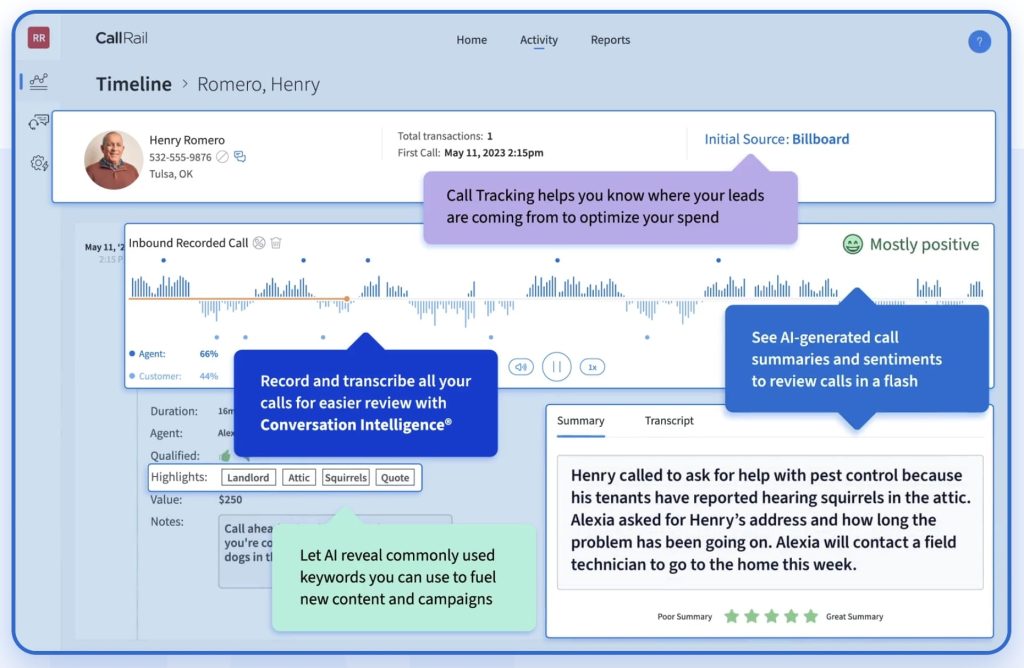
Call tracking usually depends on tracking numbers and number swapping. For example, CallRail’s dynamic number insertion overview explains how a script can swap visible phone numbers based on the visitor source, and its DNI testing guidance reinforces that pages with tracking need to be tested individually. The repair-shop takeaway is practical: do not trust attribution until the public number, swap target, routing, and destination are tested on real pages.
If call attribution is the immediate leak, the deeper setup belongs in an automotive call tracking workflow. The software-stack decision is broader: once the call is tracked, the shop still needs to know whether it was answered, qualified, booked, recovered, or lost.
Connect Website Events to Shop Outcomes
Website events can help, but they should not stop at form submissions. GA4 recommended events include lead events such as generate_lead, which can work for forms or appointment requests. For auto repair, add operational outcome fields outside the analytics platform: service type, location, connected call, qualified opportunity, confirmed appointment, showed, rescheduled, no-show, and completed repair order.
For ads, Google Ads phone call conversion tracking can show which campaigns drive valuable calls. That is only the first layer. A repair shop still has to define what a valuable call means: connected, long enough to matter, serviceable, booked, or completed.
| Data point | Where it may start | Where it must end |
|---|---|---|
| Campaign source | Ad platform, URL parameters, call tracking, or form hidden fields. | Booked job report by source and service. |
| Phone call | Tracking number, Google call asset, website call click, or direct number. | Connected call, qualified request, appointment outcome. |
| Form lead | Website form or landing page. | Owned CRM task with service, vehicle, location, and follow-up status. |
| Review request | CRM, shop system, or reputation tool. | Real customer review request and professional response workflow. |
| Reminder campaign | SMS/email platform. | Visit, declined-work recovery, or repeat repair outcome. |
CRM and Follow-Up Requirements
A marketing stack fails when the CRM is treated as storage instead of action. Repair shops need customer and vehicle records, but marketing value comes from what the team does next: call back, confirm, follow up on an estimate, send a reminder, request a review, or recover declined work.
When choosing CRM software, compare actual repair workflows before booking demos. The auto repair CRM comparison is the better place to evaluate CRM-specific options, while this article keeps CRM in context as one layer of the marketing stack.
- Every new lead should create or update a customer record without creating duplicates.
- Vehicle, concern, source, location, and next step should be visible to the advisor.
- Unbooked calls and estimates should create follow-up tasks with owners.
- Declined work should be available for future reminders without manual searching.
- The owner should see open opportunities, booked jobs, and lost reasons by source.
Reviews and Retention Tools
Review and retention software can be useful, but only when it respects the customer relationship. A shop should ask real customers for honest feedback after real visits, reply professionally, and use reminders that match the vehicle and service history.
Google’s review guidance is important because it warns against incentives or misleading engagement. Any review tool in the stack should make compliant requests easier, not pressure the team into shortcuts that can damage trust.
| Workflow | Good software support | Risk to avoid |
|---|---|---|
| Review request | Send after a real completed visit with a clear link and no incentive. | Bulk requests to unverified contacts or reward-based review asks. |
| Review reply | Keep replies short, professional, and specific when useful. | Template replies that sound detached from the customer issue. |
| Service reminder | Use vehicle, mileage, history, and declined work where available. | Generic promotions sent to every contact. |
| Winback | Segment by last visit, service type, and customer value. | Repeated messages without a reason to return. |
| Slow-day campaign | Use capacity and service fit to choose the offer. | Discount blasts that attract low-fit jobs. |
Stack by Shop Maturity
A small shop does not need the same stack as a regional group. The stack should mature as the process matures. Buying ahead of adoption usually creates unused software and messy reporting.
| Stage | Best next layer | Do not skip |
|---|---|---|
| Starter shop | Website lead capture, GBP basics, call tracking for key campaigns, simple CRM notes. | Answer-rate and booked-job tracking. |
| Growing shop | Review workflow, declined-work follow-up, SMS/email reminders, source reporting. | Advisor adoption and clean customer records. |
| Paid acquisition | Landing page events, call conversion tracking, campaign-source reporting. | Qualified-call and booked-job definitions. |
| Retention-focused shop | Customer segmentation, maintenance reminders, winback campaigns, review management. | Permission, service history, and message relevance. |
| Multi-location group | Location-level dashboards, service routing, central reporting, shared field definitions. | The multi-location auto repair booking workflow that keeps location, service, source, owner, and outcome attached. |
Questions to Ask Vendors
Do not compare vendors only by feature count. Ask questions that expose implementation cost, data quality, adoption risk, and reporting usefulness. Prices change often, so the buying checklist should focus on what is included, how pricing scales, and what work the shop must still do.
| Question | Why it matters | Weak answer |
|---|---|---|
| What is pricing based on? | Shops may pay by location, user, phone number, message volume, feature tier, or onboarding. | A headline price that excludes required setup or usage. |
| What fields sync with our CRM or shop system? | Marketing reports are weak if customer, vehicle, service, and outcome data do not move. | Only name, phone, and email sync. |
| How are calls and forms deduplicated? | Duplicate records make follow-up and reporting unreliable. | The team has to merge manually every day. |
| Can we report booked jobs by source? | Lead volume alone does not show marketing performance. | The tool reports calls and forms but not appointment or repair outcomes. |
| Who uses it daily? | Advisor adoption decides whether the tool works. | Only the owner or agency can understand the dashboard. |
| How do we leave if it fails? | Contracts, number ownership, data export, and migration matter. | No clear export, number porting, or cancellation process. |
Implementation Order
Software implementation should follow the customer path. Start with source capture, then call/form ownership, then CRM notes, then follow-up, then reporting. Advanced automation can wait until the basic process is stable.
- Define the required fields: source, location, service type, vehicle, contact, call outcome, booking status, and completed repair status.
- Map public entry points: Google profile, ads, organic service pages, location pages, referral links, and repeat-customer messages.
- Set up call tracking and website events only where they answer a real reporting question.
- Connect calls and forms to CRM or shop-system records with clear advisor ownership.
- Add review requests, declined-work follow-up, reminders, and winback lists after customer records are clean.
- Build one weekly report that shows source, qualified calls, booked appointments, and completed repairs.
- Add more tools only when the previous layer is used consistently.
Mistakes to Avoid Before Buying
The common mistakes are predictable. Shops buy broad platforms before they define the workflow, or they buy narrow tools that cannot share useful data. Both paths create dashboards instead of decisions.
- Do not let call tracking dominate the whole stack. It answers source and call questions, not every marketing problem.
- Do not buy CRM software if the advisor desk will not record outcomes.
- Do not report every call or form as a lead without qualification.
- Do not send review requests in ways that conflict with platform rules.
- Do not use SMS/email campaigns without service-history context and permission.
- Do not add phone-system, AI receptionist, or chatbot topics here. This article is about marketing software stack selection and outcome reporting.
- Do not compare vendors without checking export, number ownership, integrations, onboarding, and cancellation terms.
When to Get Help
If the main leak is attribution, call tracking for auto repair shops is the most direct place to start. The goal is not just more tracking numbers; it is a clean path from source to connected call, qualified opportunity, booked appointment, and completed repair.
If the problem is bigger than attribution, review auto repair lead generation in context. A stronger campaign can still fail if the shop cannot answer, qualify, follow up, and report outcomes.
Once the shop knows which leak it wants to fix first, it can schedule a call to walk through the current stack, tracking gaps, CRM handoff, and reporting requirements.
FAQ
What does marketing software do for a repair shop?
It helps repair shops attract leads, track sources, manage follow-up, request reviews, send reminders, recover missed opportunities, and report which channels create booked repair work.
What is the best marketing software for a repair shop?
The best tool depends on the leak. Use call tracking when attribution is missing, CRM when follow-up is weak, review software when trust signals are thin, SMS/email when retention is weak, and reporting tools when the owner cannot connect source to booked jobs.
Is shop management software the same as marketing software?
Not always. Shop management software usually handles estimates, repair orders, invoices, workflow, and customer records. Marketing software focuses on acquisition, attribution, communication, reviews, retention, and reporting. Some platforms combine both, but the workflows still need to be evaluated separately.
Should a small repair shop buy an all-in-one platform?
Only if the team will use the core workflow. A smaller stack that tracks calls, captures leads, records follow-up, requests reviews, and reports booked jobs is better than an all-in-one platform that nobody maintains.
Where does CallRail fit in an auto repair software stack?
CallRail-type tools fit in the attribution layer. They can help identify which channels drive calls and form submissions, but the shop still needs CRM notes, booking outcomes, review workflows, and retention reporting.
What should a shop track before buying more software?
Track source, service type, connected calls, qualified opportunities, missed calls, booked appointments, no-shows, completed repairs, review requests, and follow-up tasks. Those fields show which tool should come next.
Conclusion
The right marketing stack should make the shop easier to find, easier to contact, easier to follow up with, and easier to measure. Start with the leak, choose the category that fixes it, connect the data to booked repair work, and add the next layer only when the current workflow is actually being used.